Just the chonkiest of essentials
Chonk Face.
Little Fuss.
Chonky Essentials with Google Calendar support for Garmin Fenix series.
Just the Chonkiest of essentials, always at a glance.
Fenix, Enduro, Tactix & Quatix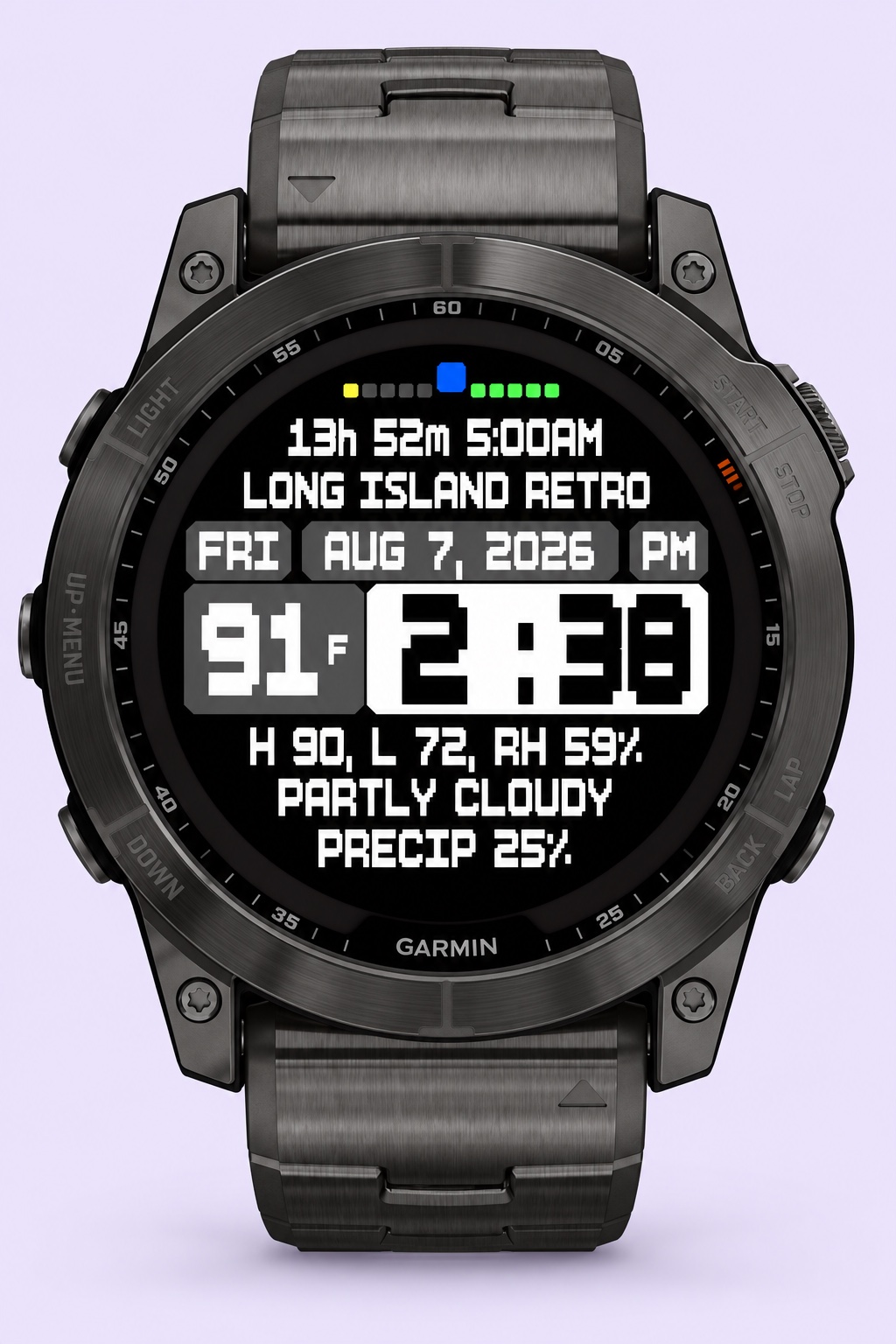 Chonky by name.
Handy by nature.
Small details. Big personality.
A face full of
good stuff.
Every little bit has a job.
Pick a label and we’ll point it out.
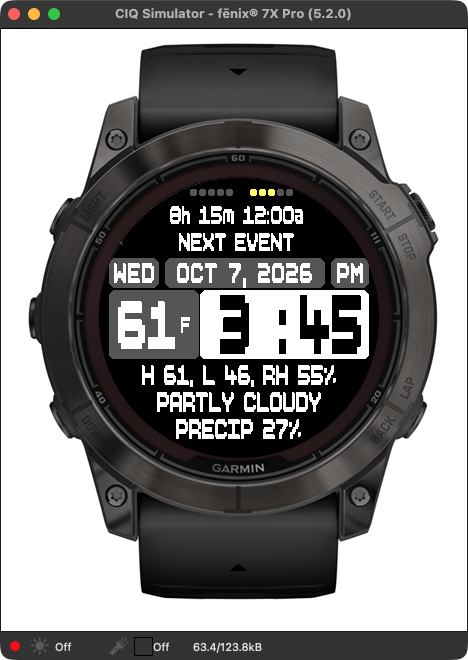
Your watch face, up close and personal.
A little heads-up for your day
Time until your next event.
A countdown and the event’s start time stay right at the top of the face. Know what’s coming without opening your calendar.
For lives with more than one calendar
Many calendars.
One little
heads-up.
Work stuff. Family stuff. The fun stuff. Chonky looks across your connected Google calendars and brings the next timed event to the top.
The countdown stays in view, with the event name just below it. A quick wrist glance answers the very important question: “How long have I got?”
The earliest upcoming timed event wins. Events are selected within the next 24 hours.
Straight from Garmin
Native weather.
No need to mess around with any 3rd party API keys.
Current temperature, high and low, relative humidity, conditions, and the chance of precipitation. The outside world, conveniently inside your watch.
Explore the weather detailsYour wrist deserves a little character
Serious essentials.
Unserious name.
Chunky pixel lettering. Tiny color pops. A layout that gives the useful stuff room to breathe. Because practical can have a personality.
Your kind of time.
Choose a 12- or 24-hour clock, with AM/PM shown in 12-hour mode.
Your kind of weather.
Fahrenheit or Celsius. Pick the unit your brain likes.
Your kind of date.
Choose US, European, or Japanese date formatting.
Same chonk. More wrists.
Is your watch
chonky-ready?
Nine compatible models & variants.
Chonky Essentials is made for these Garmin watches with a 280 × 280 MIP display. Each matching simulator profile passed screen-fit checks in both 12- and 24-hour mode.
- Fenix 7X
- Fenix 7X Pro
- Fenix 7X Pro Solar no Wi-Fi variant
- Enduro 2
- Enduro 3
- Tactix 7 MIP versions
- Quatix 7X Solar
- Fenix 8 Solar 51mm
- Tactix 8 Solar 51mm
A little clarity before you get chonky. Fenix 7X Pro has been used on a real watch. The additional models have been checked in Garmin’s simulator. These results apply to the upcoming build; the newest build still needs real-watch testing. Compatible firmware supporting Connect IQ 5.2 or later is required.
A few un-chonky answers
Good questions.
Which watches are supported?
The upcoming build supports these Garmin models and variants:
- Fenix 7X
- Fenix 7X Pro
- Fenix 7X Pro Solar Edition — no Wi-Fi variant
- Enduro 2
- Enduro 3
- Tactix 7 — MIP display versions
- Quatix 7X Solar
- Fenix 8 Solar — 51mm
- Tactix 8 Solar — 51mm
These watches use a 280 × 280 MIP display and require firmware supporting Connect IQ 5.2 or later. Fenix 7X Pro has real-watch use; the additional models passed simulator screen-fit checks. AMOLED editions, smaller screen sizes, and other models are not supported by this build.
How does Google Calendar support work?
Choose Google Calendar in the watch-face settings and authorize your Google account using the device code shown on your watch. Your primary calendar is included; you can add up to five additional calendar IDs that account can access. Chonky shows the next upcoming timed event across those calendars, within the next 24 hours. All-day and multi-day events are excluded.
Does it change anything in my calendar?
No. Google Calendar access is read-only. Chonky reads upcoming events to display the next event and its countdown. You can revoke access in your Google Account at any time. See our privacy policy for the details.
Do I need Google Calendar to use the face?
No. You can choose Garmin’s calendar source instead. The time, weather and other watch information do not require a Google Calendar connection.
Where does the weather come from?
The watch face uses Garmin’s native weather information. It doesn’t need a separate third-party weather account or API key. Weather and calendar updates depend on your phone connection, Garmin Connect, device settings and service availability.
Can I buy it yet?
Chonky Essentials is being prepared for a public Connect IQ release. Pricing and a purchase link will appear here when the release is ready. For now, get to know the face and its features.
Go on.
Get a little chonky.
Essential Google Calendar info right on your wrist, always up to date, letting you know when your next appointment is, down to the minute.
Take another peek Public release & pricing coming soon.